Mixture-of-Experts (MoE) models, such as Qwen3.6 and Gemma 4, have revolutionized local AI inference. By activating only a subset of parameters per token, they deliver performance comparable to dense models while requiring significantly lower computational and memory resources.
Having run them for a few weeks, I see great potential. If you’re a “vibe coder” who relies heavily on a model’s innate capabilities, then you will likely not abandon a subscription to frontier LLMs. However, if you use models primarily as specialized tools for well-scoped tasks, and have access to the right hardware, then you may be able to get most of the benefits of larger models locally.
This article provides a technical guide to configuring llama.cpp and OpenCode for optimal local MoE inference on Linux and consumer-grade dedicated GPUs. We will cover compiling llama.cpp with CUDA support, configuring dense and expert layers offloading in llama-server, and customizing OpenCode to handle the specific constraints of smaller models.
- 1 Quick demo
- 2 Background
-
3
Configuring llama.cpp
- 3.1 Compilation
- 3.2 Server config
- 3.3 Manual tuning
-
4
Configuring OpenCode
- 4.1 Base config
- 4.2 Model variants
- 4.3 Small model workaround
-
5
Working with smaller models
- 5.1 Plan mode
- 5.2 Compaction
- 5.3 Fewer tools
- 5.4 Websearch
- 5.5 Knowledge cutoff
-
6
Dense models
- 6.1 llama.cpp config
- 6.2 OpenCode config
- 6.3 Benchmarks
- 7 Conclusion
1 Quick demo
Here’s a basic demo that shows what you can do fully locally with the setup described in this article:
Here are more substantial examples of things I’ve done so far with these models:
- Bootstrap of
sloppy, in particular the API part and getting things working quickly against a real llama-server instance. - Bootstrap and integration tests for
loki-exporter, which again works well when you have a Loki instance that the model can play with. - Help with this commit in which I moved some files the way I wanted and then I asked OpenCode to fix compilation.
- This other commit in which I asked OpenCode to fix grammar and spelling mistakes in the 25 previous posts of this blog.
- This very article, where I used AI for the initial French to English translation, to suggest improvements, rewrites, and for proofreading.
When you throw custom tools into the mix, the possibilities are endless.
2 Background
With all-in-one cloud LLM services, we rarely think about what happens behind the API, how models are configured, or what hardware is performing the work. This section summarizes what you need to know to run models locally.
2.1 Models
Local LLMs currently fall into two categories:
- Dense models activate all their parameters for every token produced. A 27 billion parameter dense model always activates all 27 billion parameters, regardless of the task.
- Mixture of Experts (MoE) models divide their weights among many “experts”
placed behind a router that only activates a subset per token. This is
indicated by the numbers in the model names:
35B-A3Bmeans 35 billion total parameters but only 3 billion active per token generation.
The practical consequence is that MoE models can offer capabilities comparable to dense models with an order of magnitude fewer active parameters, making inference speed comparable to much smaller models. This article focuses on the following two complementary MoE models, both republished by Unsloth:
- Gemma 4 26B A4B: better at language tasks.
- Qwen3.6 35B A3B: better at agentic coding.
These models are multimodal, so they accept text, images, and even videos (which are basically sequences of timestamp + image). Images are split into patches of 32x32 pixels for Qwen3.6 and 48x48 for Gemma 4, which are then embedded to produce vision tokens. Both of these models maintain the original aspect ratio (only slightly scaled to fit the grid). The main difference is that Gemma 4 has discrete token budgets (70, 140, 280, 560, 1120) which correspond to a discrete number of patches, whereas Qwen3.6 has a variable token budget.
To run these models on consumer hardware we need some quantization, which means
reducing the precision of their weights (e.g., from 16-bit to 4-bit) to
significantly reduce the memory footprint. For example, Q4_K_XL is a 4-bit
quantization that attempts to preserve most of the original quality (so not
everything is quantized at exactly 4 bits). There are two other concepts
related to quantization:
- Unsloth Dynamic (UD) is a dynamic quantization method used by Unsloth that attempts to minimize KL Divergence and model size.
- Quantization-Aware Training (QAT) for Gemma 4, means that the model training takes into account the effects of quantization to minimize quality loss. The net effect is that the model is smaller and more accurate.
2.2 Software
Inference is broken down into two distinct phases, each with different performance characteristics:
- Prefill (prompt processing): the model processes the input tokens in parallel to populate the key/value (KV) cache. This phase is compute-bound, hence speed depends directly on computing power, which favors GPUs capable of many parallel operations.
- Decode (token generation): the model generates output tokens one by one, sequentially reading the model’s weights and KV cache. This phase is memory-bandwidth-bound, hence performance depends on the speed at which data can be read from memory.
Inference relies on specialized backends to execute tensor computations on a target hardware. llama.cpp, the software that we will use for inference, implements several backends: CUDA for NVIDIA GPUs, Vulkan for most GPUs, and direct CPU execution. Each of these backends presents a trade-off between performance and available memory, which naturally leads to the question of hardware choice.
2.3 Hardware
The main constraint for running these models is the amount of memory. A good rule of thumb is that you need approximately as much RAM + VRAM as the size of the GGUF file on disk, plus about 3-5 GB extra for internal buffers and the KV cache. The two MoE models covered here are ~21 GB each, so you need at least 24 GB of unified memory to run comfortably with a 131k token context window.
From best to worst:
- Dedicated GPUs (like the NVIDIA RTX series) are ideal, and even previous-generation cards remain competitive thanks to their higher VRAM-to-price ratio (such as the 3090 with 24 GB of VRAM).
- Integrated GPUs via Vulkan can offer a functional alternative, but since they rely on system RAM, they have lower memory bandwidth and thus much lower performance.
- NPUs remain limited due to immature software and model support, at least on Linux.
- CPU-only execution is possible but impractical for interactive use unless you run a very small model.
This article is based on my experience running models on a dedicated NVIDIA GPU, but I expect most of it to apply to any dedicated or integrated GPU with only minor tweaks.
3 Configuring llama.cpp
llama.cpp is an open-source suite of tools that allows for local inference, supports various backends, and even includes a WebUI. A number of tools like Ollama or LM Studio wrap llama.cpp (or rely on the underlying ggml library). The main disadvantage compared to these tools is that llama.cpp is somewhat low-level. For certain backends, you must compile it yourself, but we’ll see that it’s not that complicated.
3.1 Compilation
There are many llama.cpp releases, and no version is considered “stable”. But once you have a functional setup, you can just update it from time to time whenever new models are released or fixes are made. Here is the script I use to download and compile a snapshot:
#!/bin/sh

set -eu

if [ -z "${1:-}" ]; then
    INSTALL_VERSION="$(curl -sL https://api.github.com/repos/ggml-org/llama.cpp/releases/latest | jq -r .tag_name)"
else
    INSTALL_VERSION="$1"
fi

INSTALL_DIR="$HOME/downloads/llama.cpp/$INSTALL_VERSION"

if [ -d "$INSTALL_DIR" ]; then
	echo "Error: $(readlink -f "$INSTALL_DIR") already exists"
	exit 1
fi

mkdir -p "$INSTALL_DIR"
curl -sL "https://github.com/ggml-org/llama.cpp/archive/refs/tags/$INSTALL_VERSION.tar.gz" \
  | tar -xzv --strip-components=1 -C "$INSTALL_DIR"
cd "$INSTALL_DIR"

cmake -B build -DGGML_CUDA=ON
cmake --build build --config Release -j8 --target llama-bench llama-cli llama-fit-params llama-server

echo "Installed to $(readlink -f "$INSTALL_DIR")"
Important compilation options:
-DGGML_CUDA=ONenables the CUDA backend (see build llama.cpp locally for other options).--targetlimits the compilation to a few binaries.-j8enables multithreading up to 8 threads.
You will probably need to install certain build dependencies:
$ pacman -S base-devel cmake cuda-headers jq
You can then build the latest release like this:
$ sh update-llama.sh
...
Installed to ~/downloads/llama.cpp/b9860
Finally, you can cd ~/downloads/llama.cpp/b9860 and check that the devices
are detected:
$ ./build/bin/llama-cli --list-devices
ggml_cuda_init: found 1 CUDA devices (Total VRAM: 15841 MiB):
  Device 0: NVIDIA GeForce RTX 5080 Laptop GPU, compute capability 12.0, VMM: yes, VRAM: 15841 MiB
Available devices:
  CUDA0: NVIDIA GeForce RTX 5080 Laptop GPU (15841 MiB, 15392 MiB free)
3.2 Server config
To get good performance on MoE models, the secret is to maximize GPU utilization for always-active layers by offloading some experts to the CPU. The idea is that the cost of running them there is amortized because they are smaller and not always needed.
The following configuration is based on llama.cpp’s autofitting, which is enabled by default. Instead of guessing how many layers to offload, we let llama.cpp determine the exact configuration that maximizes VRAM utilization:
[*]
cache-ram = 8192
kv-unified = true
no-mmap = true
sleep-idle-seconds = 300

[unsloth/gemma-4-26B-A4B-it-qat-GGUF:Q4_K_XL]
alias = gemma-4-26b-a4b
hf-repo = unsloth/gemma-4-26B-A4B-it-qat-GGUF:UD-Q4_K_XL
ctx-size = 131072
ctx-checkpoints = 3
no-mmproj-offload = true

[unsloth/Qwen3.6-35B-A3B-GGUF:Q4_K_XL]
alias = qwen3.6-35b-a3b
hf-repo = unsloth/Qwen3.6-35B-A3B-GGUF:UD-Q4_K_XL
ctx-size = 131072
no-mmproj-offload = true
Then we can start the server like this:
$ ./build/bin/llama-server \
  --api-key sk-lisan-al-gaib \
  --parallel 2 \
  --models-max 1 \
  --models-preset ~/.config/llama.cpp/models.ini
The following options manage the server lifecycle and its capacity:
parallel: number of parallel slots (active sessions). Each slot maintains its own KV cache unlesskv-unifiedis enabled, in which case the entire context size is shared among the slots.models-max: maximum number of models loaded simultaneously, which must, of course, share resources. llama.cpp automatically loads and unloads models based on the requests that are made.models-preset: path to the server configuration file.port: server listening port.sleep-idle-seconds: delay before automatically unloading inactive models.
The following parameters define the model options:
alias: alternative name that can be used through the API.hf-repo: HuggingFace repo name. The model is automatically downloaded to~/.cache/huggingface/hub/. You can use the HuggingFace CLI to manage these models, for example,hf cache prune -yto remove outdated revisions.
Now for the parameters to maximize GPU utilization:
kv-unified: shares the KV cache among active slots to reduce VRAM consumption. However, if theparalleloption is specified, this is disabled, hence we have to enable it explicitly.no-mmproj-offload: does not offload the multimodal projection model to the GPU, which saves a bit of VRAM at the cost of slower prefill speed when using images as input (which I almost never do).
And finally, the parameters that affect RAM usage:
cache-ram: RAM reserved for setting up “virtual” KV cache slots (faster than recomputing the entire KV cache when actual session concurrency is higher thanparallel).ctx-checkpoints: number of context checkpoints kept in RAM (I limit this to 3 for Gemma 4 because its checkpoints are much larger than Qwen3.6’s; since llama.cpp saves 32 by default, it can easily cause OOMs).no-mmap: favors direct RAM allocation over disk memory-mapping, which slightly improves performance.
Note that with the GGML Universal File (GGUF) format, a number of parameters like the chat template are predefined. There are obviously many other options, the list of which can be found in llama-server’s README.
3.3 Manual tuning
Inevitably, you will want to improve performance, and the first step is
generally to run benchmarks with different options. Here, we will look at
ubatch-size, which controls the batch size during prefill. We can test
different ubatch-size values with llama-bench for different prompt sizes
and find that with Qwen3.6, increasing ubatch-size from 512 to 2048 tokens
can double the prefill speed on longer prompts:
$ ./build/bin/llama-bench \
  --hf-repo unsloth/Qwen3.6-35B-A3B-GGUF:UD-Q4_K_XL \
  --fit-target 256 --fit-ctx 131072 \
  --ubatch-size 512 --ubatch-size 2048 \
  --n-prompt 512 --n-prompt 2048
ggml_cuda_init: found 1 CUDA devices (Total VRAM: 15841 MiB):
  Device 0: NVIDIA GeForce RTX 5080 Laptop GPU, compute capability 12.0, VMM: yes, VRAM: 15841 MiB
| model                           |       size |  params | backend | ngl | n_ubatch | fitt |   fitc |   test |             t/s |
| ------------------------------- | ---------: | ------: | ------- | --: | -------: | ---: | -----: | -----: | --------------: |
| qwen35moe 35B.A3B Q4_K - Medium |  20.81 GiB | 34.66 B | CUDA    |  99 |      512 |  256 | 131072 |  pp512 | 1155.18 ± 20.10 |
| qwen35moe 35B.A3B Q4_K - Medium |  20.81 GiB | 34.66 B | CUDA    |  99 |      512 |  256 | 131072 | pp2048 | 1119.00 ± 28.61 |
| qwen35moe 35B.A3B Q4_K - Medium |  20.81 GiB | 34.66 B | CUDA    |  99 |      512 |  256 | 131072 |  tg128 |    80.64 ± 3.69 |
| qwen35moe 35B.A3B Q4_K - Medium |  20.81 GiB | 34.66 B | CUDA    |  99 |     2048 |  256 | 131072 |  pp512 | 1103.04 ± 17.52 |
| qwen35moe 35B.A3B Q4_K - Medium |  20.81 GiB | 34.66 B | CUDA    |  99 |     2048 |  256 | 131072 | pp2048 |  2001.80 ± 8.50 |
| qwen35moe 35B.A3B Q4_K - Medium |  20.81 GiB | 34.66 B | CUDA    |  99 |     2048 |  256 | 131072 |  tg128 |    81.22 ± 4.10 |
Once you identify a satisfactory configuration, you can freeze it so as not to
rely on autofitting anymore. llama-fit-params allows you to obtain the
automatically determined parameters (but don’t forget to specify all options
that can influence memory usage, such as ubatch-size):
$ ./build/bin/llama-fit-params \
  --hf-repo unsloth/Qwen3.6-35B-A3B-GGUF:UD-Q4_K_XL \
  --fit-target 256 --ctx-size 131072 \
  --ubatch-size 2048
ggml_cuda_init: found 1 CUDA devices (Total VRAM: 15841 MiB):
  Device 0: NVIDIA GeForce RTX 5080 Laptop GPU, compute capability 12.0, VMM: yes, VRAM: 15841 MiB
llama_params_fit_impl: projected to use 29197 MiB of device memory vs. 15292 MiB of free device memory
llama_params_fit_impl: cannot meet free memory target of 256 MiB, need to reduce device memory by 14161 MiB
llama_params_fit_impl: context size reduced from 262144 to 131072 -> need 3804 MiB less memory in total
llama_params_fit_impl: with only dense weights in device memory there is a total surplus of 8402 MiB
llama_params_fit_impl: filling dense-only layers back-to-front:
llama_params_fit_impl:   - CUDA0 (NVIDIA GeForce RTX 5080 Laptop GPU): 41 layers,   7097 MiB used,   8194 MiB free
llama_params_fit_impl: converting dense-only layers to full layers and filling them front-to-back with overflow to next device/system memory:
llama_params_fit_impl:   - CUDA0 (NVIDIA GeForce RTX 5080 Laptop GPU): 41 layers (24 overflowing),  14922 MiB used,    370 MiB free
llama_params_fit: successfully fit params to free device memory
llama_params_fit: fitting params to free memory took 3.39 seconds
main: printing fitted CLI arguments to stdout...
-c 131072 -ngl 41 -ot "blk\.17\.ffn_down.*=CPU,blk\.18\.ffn_(up|down|gate_up|gate)_(ch|)exps=CPU,blk\.19\.ffn_(up|down|gate_up|gate)_(ch|)exps=CPU,blk\.20\.ffn_(up|down|gate_up|gate)_(ch|)exps=CPU,blk\.21\.ffn_(up|down|gate_up|gate)_(ch|)exps=CPU,blk\.22\.ffn_(up|down|gate_up|gate)_(ch|)exps=CPU,blk\.23\.ffn_(up|down|gate_up|gate)_(ch|)exps=CPU,blk\.24\.ffn_(up|down|gate_up|gate)_(ch|)exps=CPU,blk\.25\.ffn_(up|down|gate_up|gate)_(ch|)exps=CPU,blk\.26\.ffn_(up|down|gate_up|gate)_(ch|)exps=CPU,blk\.27\.ffn_(up|down|gate_up|gate)_(ch|)exps=CPU,blk\.28\.ffn_(up|down|gate_up|gate)_(ch|)exps=CPU,blk\.29\.ffn_(up|down|gate_up|gate)_(ch|)exps=CPU,blk\.30\.ffn_(up|down|gate_up|gate)_(ch|)exps=CPU,blk\.31\.ffn_(up|down|gate_up|gate)_(ch|)exps=CPU,blk\.32\.ffn_(up|down|gate_up|gate)_(ch|)exps=CPU,blk\.33\.ffn_(up|down|gate_up|gate)_(ch|)exps=CPU,blk\.34\.ffn_(up|down|gate_up|gate)_(ch|)exps=CPU,blk\.35\.ffn_(up|down|gate_up|gate)_(ch|)exps=CPU,blk\.36\.ffn_(up|37\.ffn_(up|down|gate_up|gate)_(ch|)exps=CPU,blk\.38\.ffn_(up|down|gate_up|gate)_(ch|)exps=CPU,blk\.39\.ffn_(up|down|gate_up|gate)_(ch|)exps=CPU,blk\.40\.ffn_(up|down|gate_up|gate)_(ch|)exps=CPU"
In this example, the parameters are:
ctx-size(c): context size.n-gpu-layers(ngl): number of layers to offload to the GPU. Here the model has 41 layers, so any value greater than 41 (like 99) would also work.override-tensor(ot): manual assignment of certain tensors, in this case, the experts to the CPU, but can also be used on multi-GPU systems.
We see that override-tensor is the most flexible option but not always the
most practical. For our purpose, there is another option that has an almost
equivalent effect:
n-cpu-moe: Offload MoE weights from layers to the CPU.
To determine which value to use, we can refer to the “24 layers overflowed”
indication, so we can start by assigning 24 to this option. It is always a good
idea to then check with nvtop or
equivalent tools whether VRAM is being used optimally, and try to slightly
reduce the expert offload if not.
Here is the final optimized config for my hardware:
[*]
cache-ram = 8192
kv-unified = true
no-mmap = true
sleep-idle-seconds = 300

[unsloth/gemma-4-26B-A4B-it-qat-GGUF:Q4_K_XL]
alias = gemma-4-26b-a4b
hf-repo = unsloth/gemma-4-26B-A4B-it-qat-GGUF:UD-Q4_K_XL
ctx-size = 131072
ctx-checkpoints = 3
n-gpu-layers = 99
n-cpu-moe = 4
no-mmproj-offload = true

[unsloth/Qwen3.6-35B-A3B-GGUF:Q4_K_XL]
alias = qwen3.6-35b-a3b
hf-repo = unsloth/Qwen3.6-35B-A3B-GGUF:UD-Q4_K_XL
ctx-size = 131072
n-gpu-layers = 99
n-cpu-moe = 20
no-mmproj-offload = true
ubatch-size = 2048
4 Configuring OpenCode
OpenCode is an open-source AI coding agent. It has the advantage of working with multiple providers, being quite simple, with a well-designed TUI, and even a web version that supports worktrees and parallel sessions. However, it is not really designed for small models: the base system prompt consumes about 10,000 tokens, and it integrates many tools by default, which means it needs some customization to achieve a good experience with small LLMs.
4.1 Base config
OpenCode communicates with llama.cpp via its OpenAI-compatible API: each
provider points to the server URL (http://127.0.0.1:1234/v1) and uses the
same API key passed to the api-key flag of llama-server. The npm field
specifies the SDK to use (@ai-sdk/openai-compatible).
{
    "$schema": "https://opencode.ai/config.json",
    "enabled_providers": ["llama"],
    "provider": {
        "llama": {
            "npm": "@ai-sdk/openai-compatible",
            "name": "llama.cpp",
            "options": {
                "baseURL": "http://127.0.0.1:1234/v1",
                "apiKey": "sk-lisan-al-gaib"
            },
            "models": {
                "gemma-4-26b-a4b": {
                    "id": "gemma-4-26b-a4b",
                    "name": "Gemma 4 26B A4B",
                    "limit": {
                        "context": 131072,
                        "output": 32768
                    },
                    "modalities": {
                        "input": ["text", "image"]
                    }
                },
                "qwen3.6-35b-a3b": {
                    "id": "qwen3.6-35b-a3b",
                    "name": "Qwen3.6 35B A3B",
                    "limit": {
                        "context": 131072,
                        "output": 32768
                    },
                    "modalities": {
                        "input": ["text", "image"]
                    }
                }
            }
        }
    }
}
The basic principle is a hierarchy: providers contain models, which contain
variants that set different model options. Providers are named arbitrarily.
Here I use a single llama provider for both models.
The context and output parameters are constraints expressed in number of
tokens. context applies to the entire context so it should match the
ctx-size configured in models.ini. output stops the generation of a
single message at that the given number of tokens. It can be increased for
tasks requiring longer responses, but 32768 tokens is what the Qwen team
recommends.
The modalities option enables image input. OpenCode automatically resizes
images if they exceed 2000px of width or height, or 5 MB of size. Each model
may also have some server-side preprocessing steps for these attachments.
To see all available options, the authoritative source is the official schema, but it is not very human-readable. Fortunately, LLMs can easily read it and help navigate it.
4.2 Model variants
Model options are sent to the server to override model parameters. Some of them
can also be configured directly in models.ini to provide reasonable defaults.
llama-server looks for the following options:
temperature: controls the level of creativity/randomness. The lower the value, the more deterministic and reproducible the outputs.top_k: limits the choice to the most probable tokens at each step, discarding unlikely options.top_p: selects a subset of tokens whose sum of probabilities exceeds the threshold .min_p: filters tokens whose probability is too low compared to the best candidate, eliminating uninformative outliers.presence_penalty: penalizes token types already present in the prompt, encouraging more diverse outputs (usually you want this set to 0 for coding).repeat_penalty: penalizes consecutive sequences of identical tokens to prevent repetition loops.chat_template_kwargs: additional parameters passed to the model Jinja2 chat template, such asenable_thinking(enables/disables thinking mode) andpreserve_thinking(keeps thinking blocks in the conversation history, only relevant for Qwen3.6).parallel_tool_calls: enables batch tool calling, allowing, for instance, the model to read multiple files in a single message. Some models can be destabilized when they emit multiple tool calls but receive only a single result.
Variants can represent different configurations for the same model. You can
switch between them via the Ctrl+t shortcut. Each variant can override
default options. For example, Qwen3.6’s documentation defines two thinking
variants:
- Default: creative parameters, detailed thought, good for general problem solving.
- Coding: low temperature, zero
presence_penalty, more suitable for code generation.
Here’s the corresponding OpenCode configuration:
{
    "$schema": "https://opencode.ai/config.json",
    "enabled_providers": ["llama"],
    "provider": {
        "llama": {
            "npm": "@ai-sdk/openai-compatible",
            "name": "llama.cpp",
            "options": {
                "baseURL": "http://127.0.0.1:1234/v1",
                "apiKey": "sk-lisan-al-gaib"
            },
            "models": {
                "gemma-4-26b-a4b": {
                    "id": "gemma-4-26b-a4b",
                    "name": "Gemma 4 26B A4B Thinking",
                    "limit": {
                        "context": 131072,
                        "output": 32768
                    },
                    "modalities": {
                        "input": ["text", "image"]
                    },
                    "options": {
                        "temperature": 1.0,
                        "top_k": 20,
                        "top_p": 0.95,
                        "chat_template_kwargs": {
                            "enable_thinking": true
                        },
                        "parallel_tool_calls": true
                    }
                },
                "qwen3.6-35b-a3b": {
                    "id": "qwen3.6-35b-a3b",
                    "name": "Qwen3.6 35B A3B Thinking",
                    "limit": {
                        "context": 131072,
                        "output": 32768
                    },
                    "modalities": {
                        "input": ["text", "image"]
                    },
                    "options": {
                        "temperature": 1.0,
                        "top_p": 0.95,
                        "top_k": 20,
                        "min_p": 0.0,
                        "presence_penalty": 1.5,
                        "repeat_penalty": 1.0,
                        "chat_template_kwargs": {
                            "enable_thinking": true,
                            "preserve_thinking": true
                        },
                        "parallel_tool_calls": true
                    },
                    "variants": {
                        "Coding": {
                            "temperature": 0.6,
                            "presence_penalty": 0.0
                        }
                    }
                }
            }
        }
    }
}
4.3 Small model workaround
OpenCode needs a fast model for tasks like session title generation. In the
absence of an explicit configuration, OpenCode uses the first model in this
hardcoded
list,
which includes claude-haiku-4-5, that is available on the active provider. If
none is found, OpenCode falls back to the active model.
This poses a two-fold problem with our configuration:
- Thinking models are slow. They waste time and tokens at the start of each session just for simple title generation.
llama.cppis configured with--models-max 1, so we cannot load a second smaller model.
The workaround is to create two separate providers (gemma-4-26b-a4b and
qwen3.6-35b-a3b). In each provider, we map claude-haiku-4-5 to a
non-thinking version of the main model. This tricks OpenCode into using it as
the “small model” variant without requiring a model swap.
Schematically, we need the following hierarchy:
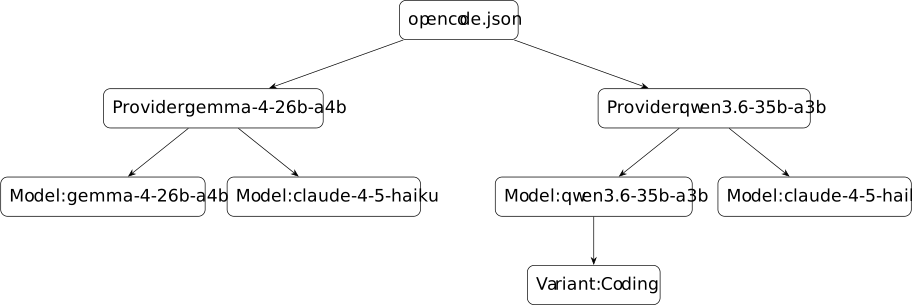
This corresponds to the following configuration:
{
    "$schema": "https://opencode.ai/config.json",
    "enabled_providers": [
        "gemma-4-26b-a4b",
        "qwen3.6-35b-a3b"
    ],
    "provider": {
        "gemma-4-26b-a4b": {
            "npm": "@ai-sdk/openai-compatible",
            "name": "llama.cpp",
            "options": {
                "baseURL": "http://127.0.0.1:1234/v1",
                "apiKey": "sk-lisan-al-gaib"
            },
            "models": {
                "claude-haiku-4-5": {
                    "id": "gemma-4-26b-a4b",
                    "name": "Gemma 4 26B A4B Instruct",
                    "limit": {
                        "context": 131072,
                        "output": 32768
                    },
                    "modalities": {
                        "input": ["text", "image"]
                    },
                    "options": {
                        "temperature": 1.0,
                        "top_k": 20,
                        "top_p": 0.95,
                        "chat_template_kwargs": {
                            "enable_thinking": false
                        },
                        "parallel_tool_calls": true
                    }
                },
                "gemma-4-26b-a4b": {
                    "id": "gemma-4-26b-a4b",
                    "name": "Gemma 4 26B A4B Thinking",
                    "limit": {
                        "context": 131072,
                        "output": 32768
                    },
                    "modalities": {
                        "input": ["text", "image"]
                    },
                    "options": {
                        "temperature": 1.0,
                        "top_k": 20,
                        "top_p": 0.95,
                        "chat_template_kwargs": {
                            "enable_thinking": true
                        },
                        "parallel_tool_calls": true
                    }
                }
            }
        },
        "qwen3.6-35b-a3b": {
            "npm": "@ai-sdk/openai-compatible",
            "name": "llama.cpp",
            "options": {
                "baseURL": "http://127.0.0.1:1234/v1",
                "apiKey": "sk-lisan-al-gaib"
            },
            "models": {
                "claude-haiku-4-5": {
                    "id": "qwen3.6-35b-a3b",
                    "name": "Qwen3.6 35B A3B Instruct",
                    "limit": {
                        "context": 131072,
                        "output": 32768
                    },
                    "modalities": {
                        "input": ["text", "image"]
                    },
                    "options": {
                        "temperature": 0.7,
                        "top_p": 0.8,
                        "top_k": 20,
                        "min_p": 0.0,
                        "presence_penalty": 1.5,
                        "repeat_penalty": 1.0,
                        "chat_template_kwargs": {
                            "enable_thinking": false
                        },
                        "parallel_tool_calls": true
                    }
                },
                "qwen3.6-35b-a3b": {
                    "id": "qwen3.6-35b-a3b",
                    "name": "Qwen3.6 35B A3B Thinking",
                    "limit": {
                        "context": 131072,
                        "output": 32768
                    },
                    "modalities": {
                        "input": ["text", "image"]
                    },
                    "options": {
                        "temperature": 1.0,
                        "top_p": 0.95,
                        "top_k": 20,
                        "min_p": 0.0,
                        "presence_penalty": 1.5,
                        "repeat_penalty": 1.0,
                        "chat_template_kwargs": {
                            "enable_thinking": true,
                            "preserve_thinking": true
                        },
                        "parallel_tool_calls": true
                    },
                    "variants": {
                        "Coding": {
                            "temperature": 0.6,
                            "presence_penalty": 0.0
                        }
                    }
                }
            }
        }
    }
}
5 Working with smaller models
Configuration gets you running, but working well with small local models requires some strategy: planning before coding, managing context proactively, and keeping the model’s workload minimal.
5.1 Plan mode
Local models perform best when they can verify the correctness of what they produce, either by compiling the code, running it against a working service, or executing a test suite. Obviously, their usefulness would be quite limited if having these guardrails always was a prerequisite.
For more open ended tasks, the planning stage is absolutely essential. It allows you to quickly realize if the model has enough context about the problem, and gives you an idea of how it intends to proceed. Without careful planning, you can only expect mediocre results.
A good way to add context is to invite the model to explore certain aspects it doesn’t seem to grasp. Often it asks “open questions” while iterating on the plan, which makes providing context even easier. Sometimes you realize the problem is more complex than it appears, and at that point you should refocus on a narrower scope.
Since no code is written at this stage, it is very easy to make major changes that would be much harder to do as a refactoring step on the generated code. Therefore, you must take the time to have a sufficiently detailed plan or ask for clarifications until you are totally satisfied with the approach.
Plan mode in OpenCode is quite well-implemented. If the model starts editing
files, it receives an error message reminding it that it is not supposed to use
edit or write. While this is not an absolute guarantee (it can still use
bash in a creative way), it is generally sufficient.
By default, OpenCode starts with the build agent which has access to all tools. Instead, I prefer to always start in plan mode:
{
    "$schema": "https://opencode.ai/config.json",
    "default_agent": "plan"
}
I also changed the colors of these agents so that the build mode is more visible:
{
    "$schema": "https://opencode.ai/config.json",
    "agent": {
        "plan": {
            "color": "#b4befe"
        },
        "build": {
            "color": "#cba6f7"
        }
    }
}
5.2 Compaction
Local models suffer from a number of technical limitations, the first being the context size, which is generally limited to 256k tokens. When approaching the limit, OpenCode triggers an auto-compaction process that activates according to these heuristics:
- If
providers.models.limits.inputis defined, OpenCode triggers compaction when fewer thancompaction.reservetokens remain on the input side. - If
providers.models.limits.outputis defined, OpenCode triggers compaction when the remaining context size is less than this value.
Concretely, with a context size of 131k and an output limit of 32k tokens, compaction activates at around 100k tokens. If this is not desired, you can either:
- Completely disable this feature with
compaction: { auto: false }and proactively trigger it with/compactor start new sessions more often. - Increase the context size to have 128k or more truly usable tokens. Context scaling techniques like YaRN/RoPE can even reach 1M tokens.
- Configure
context-shiftandkeepin llama.cpp. Unlike compaction, half of the context is removed, except forkeeptokens at the beginning (useful to keep the system prompt) as well as the most recent half. - Gain a few extra tokens by removing information from the system prompt, such as unused tools.
It should be noted that adherence to instructions placed in the system prompt
or AGENTS.md tends to degrade quickly, especially when they go against the
model’s training. Generally, AGENTS.md does not work very well for imposing
constraints on a model, instead it should be viewed as additional context.
Therefore, you should keep it as short as possible and use skills or links to
more detailed documentation that the model can discover on demand.
5.3 Fewer tools
I’ve noticed that these small models tend to use tools inconsistently.
Sometimes they run grep or find through bash instead of using the
dedicated tools. Their use of todowrite is too random to be truly useful (and
it is often better to save a TODO list in a dedicated file to have access to it
across different sessions). And then there is the interactive question tool,
which adds very little value in my opinion.
Some projects like
pi
promote the idea of a minimal harness by offering only 4 tools by default:
read, edit, write, and bash. The idea is that the model is more
effective when it has limited tools available (although one could argue that
everything can be done with just bash).
Since pi is a bit too barebones for me, I prefer to trim down OpenCode
harness by systematically disabling certain built-in tools, which saves around
3000 tokens:
{
    "$schema": "https://opencode.ai/config.json",
    "permission": {
        "codesearch": "deny",
        "glob": "deny",
        "grep": "deny",
        "lsp": "deny",
        "question": "deny",
        "todowrite": "deny",
        "websearch": "deny"
    }
}
Here I also disable codesearch and websearch (they are not enabled by
default anyway), so we will need a replacement to give the model access to
search results.
5.4 Websearch
To compensate for the absence of websearch, the model sometimes tries to use
webfetch directly to query Google, but this usage is blocked obviously. Since
I self-host SearXNG, which is a metasearch engine,
I asked OpenCode to create a tool to replace websearch:
import { tool } from "@opencode-ai/plugin"

const SEARXNG_URL = "https://CHANGEME"
const PROXY_AUTH = "Basic CHANGEME"

export default tool({
  description:
    "Search the web. Returns title, URL, and snippet.",
  args: {
    query: tool.schema.string().describe("Search query"),
    engine: tool.schema.enum(["google"]).describe("Search engine"),
  },
  async execute({ query, engine }) {
    const url = `${SEARXNG_URL}/search?q=${encodeURIComponent(query)}&engines=${encodeURIComponent(engine)}&format=json`

    const headers: Record<string, string> = {
      "Accept": "application/json",
      "Proxy-Authorization": PROXY_AUTH,
	}

    const resp = await fetch(url, { headers, signal: AbortSignal.timeout(10000) })

    if (!resp.ok) {
      return `SearXNG request failed (HTTP ${resp.status}): ${await resp.text()}`
    }

    const data = await resp.json()
    const results = (data.results || []).slice(0, 10)

    if (results.length === 0) {
      return "No results found."
    }

    return results
      .map(
        (r: any) =>
          `Title: ${r.title}\nURL: ${r.url}\nSnippet: ${r.content || "(no snippet)"}`
      )
      .join("\n---\n")
  },
})
It allows access to Google Search results (and many other search engines if desired).
5.5 Knowledge cutoff
Due to hallucinations and mixed training data sources, there is no clear knowledge cutoff date for current models, although Qwen3.6 seems to live around late 2024. This manifests as outdated patterns: the model will recommend deprecated APIs, or default to Rust 2021 edition conventions when newer patterns exist.
Fortunately, models are usually smart enough to recover. When they hit an
error, they will search for what they need using websearch, local CLI tools
like cargo search, then grep ~/.cargo/registry/src/ for the actual source
to use as ground truth. By default, OpenCode asks permission before reading
external directories, which is not YOLO-friendly. To alleviate that, it can be
authorized to read some external directories without confirmation, for example,
Rust crates source code:
{
    "$schema": "https://opencode.ai/config.json",
    "permission": {
        "external_directory": {
            "~/.cargo/registry/src/**": "allow"
        },
        "edit": {
            "~/.cargo/registry/src/**": "deny"
        }
    }
}
Be aware this can significantly expand context usage. For repeated lookups, it
may be worth encouraging the model to use subagents (for example in
AGENTS.md), or even creating an agent dedicated to finding documentation,
rather than having the main conversation accumulate large amounts of discovered
code. Skills are a good way to document common practices that the model often
gets wrong.
6 Dense models
This article focused on MoE models because they are the best tradeoff between quality and speed, so they are likely to work well on most consumer hardware. But you will see that thanks to Multi-Token Prediction (MTP), a technique that increases the inference speed without quality degradation, we can make dense models run slightly faster.
In this section we will consider these two dense models:
- Gemma 4 12B: encoder-free architecture and fully multi-modal (supports audio input). Thanks to its small size, it fits easily in 16 GB VRAM, but it is outsmarted by Gemma 4 26B A4B and Qwen3.6 35B A3B.
- Qwen3.6 27B: the most capable model in its size category, unfortunately it doesn’t fit within 16 GB VRAM so inference is slow.
I added some benchmark results at the end that compares these models and their MoE counterparts.
6.1 llama.cpp config
This is roughly the same config that we’ve seen before, with only a few additions:
[*]
cache-ram = 8192
kv-unified = true
no-mmap = true
sleep-idle-seconds = 300

[unsloth/gemma-4-12b-it-GGUF:Q4_K_XL]
alias = gemma-4-12b
hf-repo = unsloth/gemma-4-12b-it-GGUF:UD-Q4_K_XL
ctx-size = 131072
ctx-checkpoints = 6
n-gpu-layers = 99
spec-type = draft-mtp
spec-draft-n-max = 4
image-min-tokens = 1120
image-max-tokens = 1120
ubatch-size = 2048

[unsloth/Qwen3.6-27B-MTP-GGUF:Q4_K_XL]
alias = qwen3.6-27b
hf-repo = unsloth/Qwen3.6-27B-MTP-GGUF:UD-Q4_K_XL
ctx-size = 131072
n-gpu-layers = 30
no-mmproj-offload = true
ubatch-size = 2048
spec-type = draft-mtp
spec-draft-n-max = 4
The image options image-min-tokens and image-max-tokens specify the exact
number of tokens that should be used to encode images (1120 is the maximum
supported value). Contrary to Qwen3.6, Gemma 4 has discrete token budgets, and
the default is quite low.
We also have two new options related to MTP:
spec-type: specifies the draft model type.spec-draft-n-max: specifies the number of tokens generated by the draft model.
The draft model is a very small model used to predict next tokens, which is beneficial for dense models because the speed at which a prediction can be verified by a large model is much higher than the generation speed. In practice, you can almost double the decoding rate. For Qwen3.6 27B, I go from 4 to 8 tokens per second.
You may wonder why we didn’t do the same for MoE models since they also support MTP. The reason is that the number of active parameters is not high enough to see much benefit from a small draft model. It can even be detrimental because it takes a bit of VRAM, so you have to put more experts onto the CPU. For Qwen3.6 35B A3B, I lose 2 tokens per second with MTP, but feel free to experiment with it.
6.2 OpenCode config
Aside for the new “audio” modality, the OpenCode configuration is largely the same:
{
    "$schema": "https://opencode.ai/config.json",
    "enabled_providers": [
        "gemma-4-12b",
        "qwen3.6-27b",
    ],
    "provider": {
        "gemma-4-12b": {
            "npm": "@ai-sdk/openai-compatible",
            "name": "llama.cpp",
            "options": {
                "baseURL": "http://127.0.0.1:1234/v1",
                "apiKey": "sk-lisan-al-gaib"
            },
            "models": {
                "claude-haiku-4-5": {
                    "id": "gemma-4-12b",
                    "name": "Gemma 4 12B Instruct",
                    "limit": {
                        "context": 131072,
                        "output": 32768
                    },
                    "modalities": {
                        "input": ["text", "image", "audio"]
                    },
                    "options": {
                        "temperature": 1.0,
                        "top_k": 20,
                        "top_p": 0.95,
                        "chat_template_kwargs": {
                            "enable_thinking": false
                        },
                        "parallel_tool_calls": true
                    }
                },
                "gemma-4-12b": {
                    "id": "gemma-4-12b",
                    "name": "Gemma 4 12B Thinking",
                    "limit": {
                        "context": 131072,
                        "output": 32768
                    },
                    "modalities": {
                        "input": ["text", "image", "audio"]
                    },
                    "options": {
                        "temperature": 1.0,
                        "top_k": 20,
                        "top_p": 0.95,
                        "chat_template_kwargs": {
                            "enable_thinking": true
                        },
                        "parallel_tool_calls": true
                    }
                }
            }
        },
        "qwen3.6-27b": {
            "npm": "@ai-sdk/openai-compatible",
            "name": "llama.cpp",
            "options": {
                "baseURL": "http://127.0.0.1:1234/v1",
                "apiKey": "sk-lisan-al-gaib"
            },
            "models": {
                "claude-haiku-4-5": {
                    "id": "qwen3.6-27b",
                    "name": "Qwen3.6 27B Instruct",
                    "limit": {
                        "context": 131072,
                        "output": 32768
                    },
                    "modalities": {
                        "input": ["text", "image"]
                    },
                    "options": {
                        "temperature": 0.7,
                        "top_p": 0.8,
                        "top_k": 20,
                        "min_p": 0.0,
                        "presence_penalty": 1.5,
                        "repeat_penalty": 1.0,
                        "chat_template_kwargs": {
                            "enable_thinking": false
                        },
                        "parallel_tool_calls": true
                    }
                },
                "qwen3.6-27b": {
                    "id": "qwen3.6-27b",
                    "name": "Qwen3.6 27B Thinking",
                    "limit": {
                        "context": 131072,
                        "output": 32768
                    },
                    "modalities": {
                        "input": ["text", "image"]
                    },
                    "options": {
                        "temperature": 1.0,
                        "top_p": 0.95,
                        "top_k": 20,
                        "min_p": 0.0,
                        "presence_penalty": 1.5,
                        "repeat_penalty": 1.0,
                        "chat_template_kwargs": {
                            "enable_thinking": true,
                            "preserve_thinking": true
                        },
                        "parallel_tool_calls": true
                    },
                    "variants": {
                        "Coding": {
                            "temperature": 0.6,
                            "presence_penalty": 0.0
                        }
                    }
                }
            }
        }
    }
}
6.3 Benchmarks
To compare the models, I asked each of their non-thinking variants to translate
the content of this article from English to French, which requires around 15k
input and output tokens. I used the same llama-server configurations presented
in this article (context size of 131072 tokens, UD-Q4_K_XL quantization, MTP
with 4 tokens for dense models). All the tests were made with the following
setup:
- Software:
- llama.cpp b9860 (2 Jul 2026) + CUDA 13.3
- sloppy to issue direct calls to llama-server
- Hardware:
- CPU: AMD Ryzen AI 9 HX 370
- GPU: NVIDIA RTX 5080 Mobile 16 GB
- RAM: 64 GB LPDDR5
And here are the results:
| Model | Prefill (t/s) | Decode (t/s) |
|---|---|---|
unsloth/gemma-4-12B-it-GGUF | 1895 | 69.2 |
unsloth/gemma-4-26B-A4B-it-qat-GGUF | 1877 | 83.9 |
unsloth/Qwen3.6-27B-MTP-GGUF | 504 | 8.6 |
unsloth/Qwen3.6-35B-A3B-GGUF | 1555 | 69.7 |
There are a few last resort options to reduce VRAM requirements so you can increase the GPU offload and thus inference speed:
- Decrease the context size. This is undesirable when using these models as general-purpose AI coding assistants, but for well-scoped programmatic tasks, it’s an easy win.
- Pick a stronger quantization. Lowest reasonable is likely
UD-Q2_K_XL, which already significantly reduce model accuracy. - Enable KV cache quantization with the
cache-type-kandcache-type-voptions. Anything belowq8_0will severely decrease model accuracy.
Poor model accuracy is particularly noticeable for tasks that require precision, like tool calling or coding, at which point a MoE model is probably a better option.
7 Conclusion
We are fortunate that in the race to massive frontier models there is still some investment in doing AI at the edge. For those into self-hosting or FOSS, there is something uniquely rewarding about having complete control over your AI coding tools. If you already have or can afford the right hardware, then I think you’ll find that the open weight models presented in this article strike a good balance between automating boring tasks without removing all the fun of programming. I’m still trying out different coding and writing workflows to get the most out of them, and will surely talk about this again in a future article. Until then, happy coding!